
Nouveau depuis le 22 août!
Dans le secteur Orsainville, une nouvelle zone Flexibus 8 – Charlesbourg a été mise en place à l’est de l’autoroute Laurentienne, s’étendant du boulevard Jean-Talon jusqu’à la limite de la ville de Québec au nord.
De plus, la zone Flexibus 2 - La Haute-Saint-Charles a été modifiée et se limite désormais à l’ouest de l’autoroute Laurentienne.
What is Flexibus?
The Flexibus application allows you to travel within the areas where the RTC’s new on-demand transportation service is now available. You can book trips for your local transportation needs or to connect to a frequent service network, all for the same price as a bus trip.
The service is also accessible to people who use wheelchairs and three- or four-wheeled scooters. With Flexibus, riders can do things like get to a bus stop, run an errand at a local grocery store or pharmacy, or go to a community recreation centre. Hop on board!
Book your ride in just a few clics with the RTC Flexibus mobile app or the web site This link will open in a new window.
Great reasons to use Flexibus

How it works
-
Hours of operation
Flexibus operates daily, with service provided within approximately 30 minutes of booking.
-
Rates and Transfers
Flexibus costs the same as a bus ride.
Payment methods:
- OPUS or Occasional card
- Smart card or paper transfer
- RTC Nomade paiement app.
Already registered for our services (monthly pass or subscription program)? Flexibus is included.
See the RTC Fare Schedule -
Flexibus stops
Flexibus does not offer door-to-door service. It’s a public transit service with no fixed times or routes that adapts to customer demand based on departure and arrival points. You can get on and off at regular RTC stops within the service area or at one of the other points suggested when you book your trip (most often the nearest intersection), to minimize walking distance.
-
Service areas
Flexibus allows you to travel within a single service area or connect to the existing RTC bus network. To see if you are located in a service area, see the regional map.
-
Accessibility
If you have a specific accessibility need (wheelchair or three- or four-wheeled scooter), check the “Accessibility” option in your profile. Each vehicle can accommodate one person with reduced mobility.
-
Terms of use
For more details on Flexibus, see the terms of use.
Service area
Le point de montée et de descente du trajet doit obligatoirement être situé à l'intérieur des zones desservies par le service Flexibus. Il n'est pas possible de se déplacer d'une zone à une autre.
En service!
Flexibus 1 : Nord-Ouest de Québec (Val-Bélair et Loretteville)
Tous les jours de 6 h à 23 h
Flexibus 2 : Nord-Est de Québec (Wendake, Saint-Émile, Lac-Saint-Charles et Notre-Dame-des-Laurentides)
Tous les jours de 6 h à 23 h
Flexibus 3 : Nord et Est de Beauport (Sainte-Thérèse-de-Lisieux, Courville et Montmorency)
Tous les jours de 6 h à 23 h
Flexibus 4 : L'Ancienne-Lorette (Champigny et L'Ancienne-Lorette)
Tous les jours de 6 h à 23 h
Flexibus 5 : Saint-Augustin-de-Desmaures
Tous les jours de 6 h à 23 h
Flexibus 6 : Champlain (Cap-Blanc, parc du Foulon)
Tous les jours de 6 h à 23 h
Flexibus 7 : Cap-Rouge
Tous les jours de 6 h à 23 h
*Dès le 23 août 2025
How to book
-
Avec l'application
-
Sur le site Web
-
Avec le Service à la clientèle du RTC
1- Download the Flexibus mobile app.


2- Create your customer account or log in.
You’ll need to create an account or log in to book a trip.
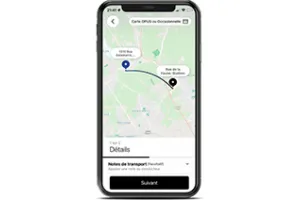
3- Book your trip
- You should be ready to leave when you book.
- Choose your point of departure (a place on the map, a specific address).
- Choose your point of arrival.
- If you’ll be travelling with other people (max. 6), add them to the trip. Note: Your wait time may vary depending on the number of people travelling with you.
- Select the payment method.* Please note: The system does not allow you to use the same smart card for multiple passengers.
- Booking takes place in real time, up to 30 minutes before departure.
- Select your preferred departure time (if applicable).
- Confirm the booking.
*Before booking your trip, make sure you have a valid transit pass, either on Nomade paiement or on a smart card (OPUS or Occasional). For more information on fares, refer to the fare schedule.
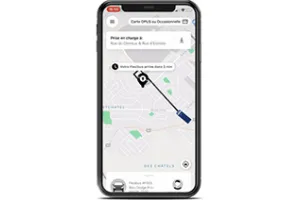
4 - Go to the virtual stop indicated on the map
- The mobile app shows you how to get to the boarding point (lien vers le pop up de « + de flexibilité ») closest to your departure point.
- You will be notified of the driver’s arrival by text message or push notification.
- You can track the vehicle that will pick you up in real time using the mobile app.
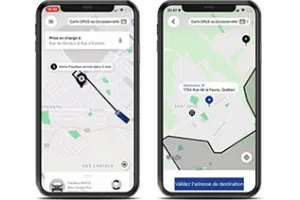
5 - Board the bus and pay for your ride
- Swipe your OPUS or Occasional card
or
Show the driver your ticket on the Nomade paiement app
or
Show the driver a valid transfer (on smart card or paper).
You must purchase your ticket before boarding. Cash payments are not accepted and drivers do not issue transfers.
- For a specific accessibility need, ask the driver for help boarding.
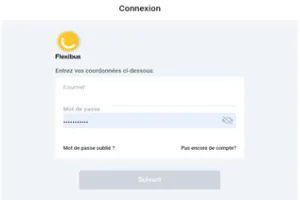
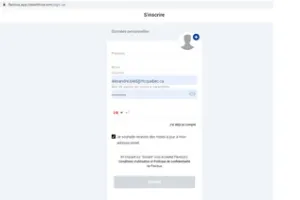
2- Create your customer account or log in.
You’ll need to create an account or log in to book a trip.
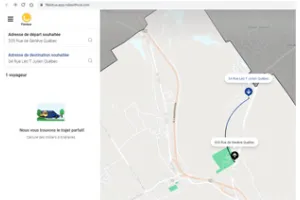
3- Book your trip
- You should be ready to leave when you book.
- Choose your point of departure (a place on the map, a specific address).
- Choose your point of arrival.
- If you’ll be travelling with other people (max. 6), add them to the trip. Note: Your wait time may vary depending on the number of people travelling with you.
- Select the payment method.* Please note: The system does not allow you to use the same smart card for multiple passengers.
- Booking takes place in real time, up to 30 minutes before departure.
- Select your preferred departure time (if applicable).
- Confirm the booking.
*Before booking your trip, make sure you have a valid transit pass, either on Nomade paiement or on a smart card (OPUS or Occasional). For more information on fares, refer to the fare schedule.
4 - Go to the virtual stop indicated on the map
- The mobile app shows you how to get to the boarding point (lien vers le pop up de « + de flexibilité ») closest to your departure point.
- You will be notified of the driver’s arrival by text message or push notification.
- You can track the vehicle that will pick you up in real time using the mobile app.
5 - Board the bus and pay for your ride
- Swipe your OPUS or Occasional card
or
Show the driver your ticket on the Nomade paiement app
or
Show the driver a valid transfer (on smart card or paper).
You must purchase your ticket before boarding. Cash payments are not accepted and drivers do not issue transfers.
- For a specific accessibility need, ask the driver for help boarding.
Go can book your Flexibus by contacting our customer support center at 418-627-2511, option 1
Monday to Friday, 7 a.m. to 7 p.m.
Saturday, Sunday, and statutory holidays from 8 a.m. to 5:30 p.m.
On-board experience
Flexibus is a public transit service. You’ll ride with up to 6 other passengers in the same vehicle. As a result, your travel time may vary depending on the number of people getting on and off. Our commitment is that the arrival time indicated on your booking confirmation will not be delayed by more than 10 minutes due to other passengers getting on our off.

Keep in mind:
- Flexibuses do not have wi-fi
- You should avoid eating or drinking on board
- Fastening your set belt is mandatory
- Children who require a car seat must be seated on the lap of the person accompanying them
- No passengers can travel while standing
Bulky items
As with regular buses, the transport of items that are bulky or that may cause injury to other passengers is prohibited unless they are packaged, transported safely, and kept under the control of the person transporting them at all times. Items being transported must not get in the way of other passengers or the driver or hinder their safety. If these conditions are not met, the driver has the right to deny access.
Frequently Asked Questions
This FAQ section answers your questions about how the Flexibus service works.